



CyberCursor Remote 0.4.1 · Endpoint 0.3.2 · Easier desktop sign-inExplore the pilot builds
WHY CYBERCURSOR

Five reasons, each with its record.

CyberCursor is a remote-access pilot for Windows, macOS and Linux, with attended Android sessions in evaluation, and a specific operating model. Every reason on this page points to the release record that backs it, and the last section lists what is not claimed.

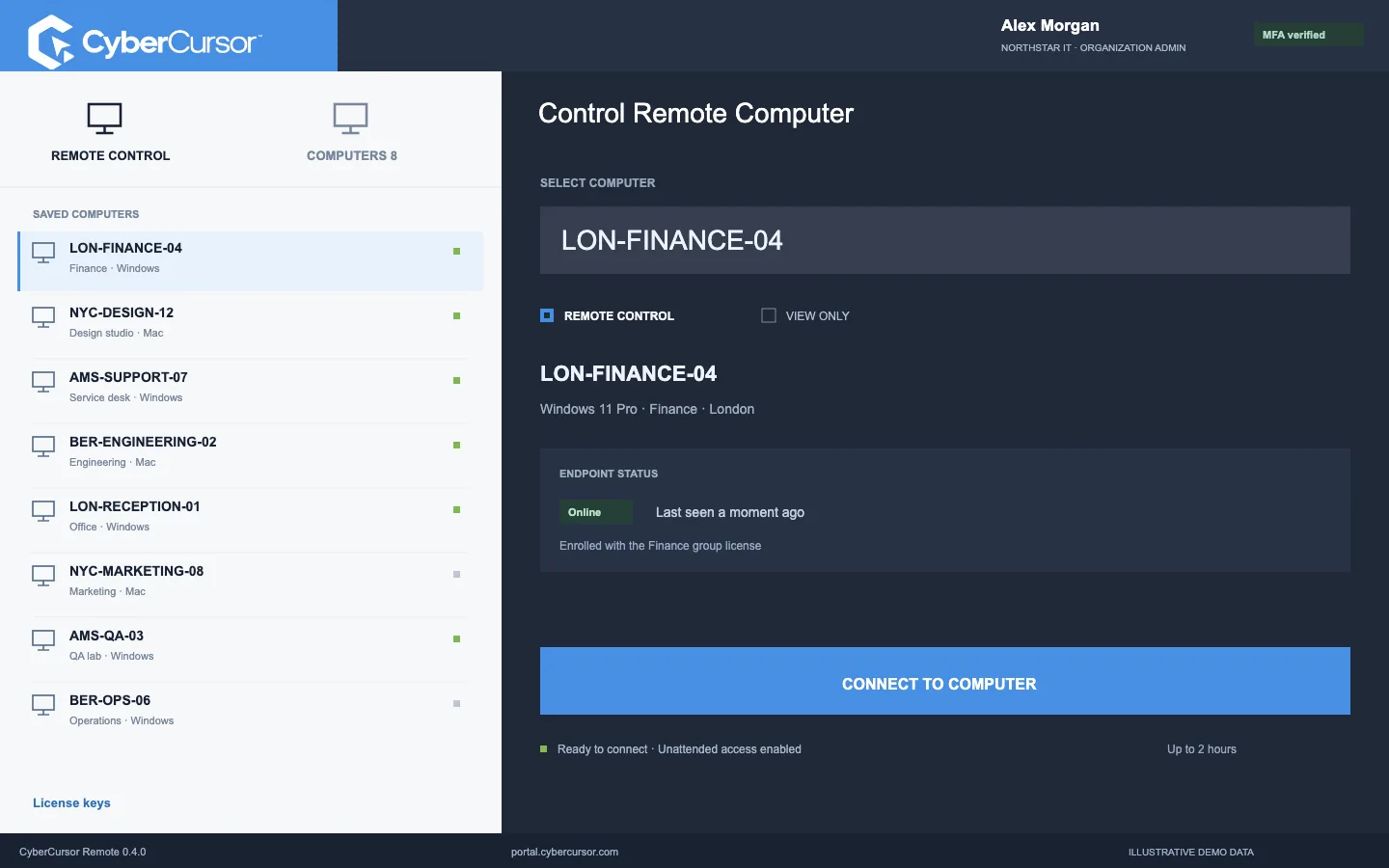
CYBERCURSOR / CONTROLLERILLUSTRATIVE VIEW
CyberCursor controller interface illustration with fictional Northstar IT devices
Product illustration · Fictional device and organization data
REASON 01 / THE BOUNDARY

Administration in the browser.
Hands-on work in an installed app.

The web portal shows the fleet, inventory, performance, groups, licences and users, and lists files read-only. Screen viewing, keyboard and mouse control, terminal commands and file changes are refused there by design and happen only in CyberCursor Remote, the installed Windows, macOS or Linux controller, over a signed channel that a browser cannot imitate. Teams get a clear answer to “where did that action come from”, and a compromised browser session cannot become a remote-control session.

Read the architecture page
Data flow between the four layersThe browser portal and the installed controller both talk to the first-party API and gateway. The gateway reaches the endpoint service for identity and heartbeat, and relays bounded desktop sessions to the endpoint’s remote engine, which shows a notification and privacy bar.BROWSER PORTALFleet administrationRead-only file listings · MFA sign-inINSTALLED CONTROLLERWindows · macOS · Linux appSessions, bounded files and terminalCYBERCURSOR API + GATEWAYSession intents and single-use proofsPostgreSQL · tenant row-level securityAppend-only, hash-chained auditCertificate-authenticated agent queueENROLLED ENDPOINTENDPOINT SERVICEIdentity enrollmentHeartbeat · reportsREMOTE ENGINEPinned session engine processSession notificationPrivacy bar while sharedDesktop traffic only via gatewayOperating-system permissions on the endpointHTTPS · COOKIE + CSRF · MFASIGNED REQUESTS · 30 S PROOF WINDOWHEARTBEAT · QUEUEBOUNDED SESSION RELAYSHIPPED PILOT · THE PORTAL NEVER OPENS A SESSION; THE CONTROLLER NEVER RUNS FLEET JOBS
Data flow between the four layersShipped pilot
REASON 02 / THE NOTICE

The endpoint is told.
Every session. No exceptions.

When an operator connects, the endpoint displays a session notification and keeps a privacy bar visible for as long as the screen is shared. There is no setting that turns it off. Unattended access follows the owner’s initial setup and saved grants, so routine desktop support needs no approval prompt, yet the person at the computer always knows a session is open. On Android, the device user must accept every session and can stop sharing at any time. Two of the four competitors reviewed document an indicator that is absent or off by default in some modes; CyberCursor’s is unconditional.

Remote sessions in detail
Session lifecycleFive steps: operator request, endpoint notice, live session with a visible privacy bar, disconnect, and a hash-chained audit record.01Operator requestFrom the installed controller,inside the assigned scope02Endpoint noticeThe endpoint shows a sessionnotification03Live sessionPrivacy bar stays visiblewhile the screen is shared04DisconnectThe session ends and the barclears05Audit recordWho, which endpoint, whatoutcome, hash-chainedSHIPPED PILOT BEHAVIOUR · THE NOTICE AND PRIVACY BAR CANNOT BE SWITCHED OFF BY THE OPERATOR
Session lifecycleShipped pilot behaviour
REASON 03 / ENROLLMENT

A license key and a name.
Not an ID and a password.

An endpoint is enrolled with a client or group license key and an agent name, entered once in the installer or supplied as a protected file by a deployment system. The server chooses the tenant, organization and group; a signed, short-lived setup profile and a per-machine single-use grant complete enrollment, and the record appears in the intended workspace automatically. Revoking a key stops future installations without disconnecting enrolled computers. There is no operator-side ID-and-password pairing step to copy around.

How license-key enrollment works
Enrollment sequenceThree stations: a client or group license key, the endpoint installer where the key and an agent name are entered, and the enrolled record that appears in the portal before a controller session.01 / LICENSE KEYOwned by the client. Scoped to a device groupwhen needed.02 / INSTALL AND ENROLLEntered once in the endpoint setup. NoID-and-password pairing step.03 / REVIEW AND CONNECTThe record appears in the intended workspace.Review it before connecting.CLIENT KEYNorthstar IT · every enrolled endpointGROUP KEYLondon office · lands in one groupCreated and revoked by the client ownerCyberCursor Agent setupLICENSE KEY••••-••••-••••-7F2AAGENT NAMELON-FINANCE-04Windows x64 · Arm64macOSChoose the processor architecture that matches the computerLON-FINANCE-04Windows 11 Pro · London officeENROLLED 10:42NEXT STEPOpen the session from the installed controllerOS permissions and report freshness are checked hereKEY + AGENT NAMEENROLLED RECORDFICTIONAL EXAMPLE DATA · THE SEQUENCE IS THE SHIPPED PILOT WORKFLOW
Enrollment sequenceShipped pilot workflow
REASON 04 / PEOPLE AND EXPIRY

Scoped managers.
Named guests that expire.

A client administrator owns the workspace. Management users receive assigned endpoints and groups for ongoing work, with scope recomputed on every request. Guests are named people with specific endpoints, a view or control mode and a mandatory expiry of between one minute and thirty days; the server caps their sessions at that expiry and closes a live relay within a second of revocation. Every operator signs in with an authenticator, and the platform owner cannot open sessions at all.

Guest access in detail Access and audit context
Access hierarchyA platform owner above a client workspace. The client creates scoped management users and named guests with mandatory expiry. Management users reach all assigned endpoints; a guest reaches two shared endpoints.01 / PLATFORM02 / CLIENT03 / DELEGATION04 / ENDPOINTSPLATFORM OWNEROrganizations, clients, high-level administrationCLIENT WORKSPACENorthstar ITOwns endpoints, groups, enrollment keys and usersMANAGEMENT USERSScope: assigned endpoints and groupsOperational workflows inside that scope onlySCOPEDNAMED GUESTSSelected endpoints · expiry is mandatoryAccess ends on the date set when sharingEXPIRESONLINELON-FINANCE-04WindowsONLINENYC-DESIGN-12macOSONLINEAMS-SUPPORT-07WindowsONLINEBER-ENG-02macOSONLINELON-RECEPT-01WindowsOFFLINENYC-MKTG-08macOSONLINEAMS-QA-03WindowsONLINEBER-OPS-06macOSALL ASSIGNED ENDPOINTSTWO SHARED ENDPOINTSFICTIONAL EXAMPLE DATA · SCOPES AND EXPIRY FOLLOW THE SHIPPED ACCESS MODEL
Access hierarchyShipped access model
REASON 05 / PRICE

One published rate.
For the whole fleet. Monthly.

Pricing is on this site: $5 per endpoint per month up to 100 endpoints, $3 from 101 to 1,000, and $1 from 1,001, with the selected rate applied to every endpoint and billed month to month. There is no annual contract, no committed minimum quantity and no request-a-quote form. The comparison pages say plainly where a competitor is cheaper and where CyberCursor is, with the published rates and their sources beside the arithmetic.

Open the calculator Published competitor prices
Whole-fleet pricing curveMonthly total against endpoints enrolled. $5 per endpoint up to 100, $3 per endpoint from 101 to 1,000, $1 per endpoint from 1,001. The total drops at each boundary because one rate applies to the whole fleet.$5 · 1–100 ENDPOINTS$3 · 101–1,000 ENDPOINTS$1 · 1,001+ ENDPOINTS$500$1,000$1,500$2,000$2,500$3,00001005001,0001,600ENDPOINTS ENROLLEDMONTHLY TOTAL, ONE RATE FOR THE WHOLE FLEET100 endpoints · $500/mo101 endpoints · $303/mo1,000 endpoints · $3,000/mo1,001 endpoints · $1,001/mo1,600 endpoints · $1,600/moA fleet of 1,001 pays less per month than a fleet of 1,000.The selected rate applies to every endpoint, not only the ones above the boundary.
Whole-fleet rate curveMonthly total in USD
HONESTY

What is not claimed.

A pilot is a pilot. These are the boundaries an evaluator should hold us to.

01

Not a security product. CyberCursor is not an endpoint detection or managed detection service. Vulnerability and file-event monitoring depend on a planned provider rollout.

02

No certifications. No SOC 2, ISO 27001 or sector compliance is claimed. The trust page states what evidence exists and what does not.

03

Evaluation builds. Only the Mac controller carries a Developer ID signature, and it is not yet notarized; the other desktop installers are unsigned and the Android APK uses the debug certificate. Physical-endpoint screen and input acceptance in production is a continuing release gate.

04

Limited platform testing. Linux is tested on Ubuntu 24.04 arm64 with X11 only, and Android on the Android 16 emulator only, with attended sessions and no unattended mode. Automation and patching are in preview with bounded foundations.

05

A channel boundary, not attestation. The signed controller channel stops a browser from imitating the app; it does not prove a managed device.

06

No customer stories. Solution pages are evaluation guides with fictional example data, not case studies.

Read the trust page Current availability
COMPARISON

Every box ticked.
Every cell sourced.

The rows are shipped capabilities; competitors keep their ticks wherever their documentation shows the feature.

Swipe or scroll to compare all platforms →

CyberCursor pilot capabilities compared with documented vendor features. Partial and unverified features are distinguished from features not offered.
FeaturesCURRENT PILOTCyberCursorEndpoint workspaceTeamViewerRemote accessDatto RMMRemote managementLevelRemote managementCrowdStrikeEndpoint security
Unattended desktop accessIncludedIncludedIncludedIncludedResponse tools
Always-on session noticeIncludedOptionalVariesNotificationNot stated
Mandatory operator MFAIncludedOptionalIncludedOptionalIncluded
Tamper-evident audit trailIncludedNot statedNot statedNot statedNot stated
Public endpoint pricing$5 → $1By planQuote onlyIncludedIncluded
Month-to-month billingIncludedNot offeredBy contractIncludedIncluded
Published pricingUSD · checked 11 October 2026
Product and billing scopes differ.
1–100 endpoints$5per endpoint / month$3 at 101–1,000 · $1 at 1,001+View rates
Get the app
Regional pricingBy regionper licensed userAnnual subscription · depends on planView rates
Tailored pricingQuoteper managed deviceRequest pricing for your deploymentView rates
Standard monthly rate$2per device / monthFree up to 10 · bulk quotes at 1,500+View rates
Falcon Go$7.99per device / monthMonthly billing · up to 100 devicesView rates

✓ Documented   ◐ Partial or configurable   × Not offered   — Not established.
CyberCursor is in pilot. Vendor documentation reviewed 2026-10-10. Select a cell for details and sources.

Full comparison & sources
ROADMAP

Room to grow.
A clear release path.

Pilot, preview and planned, honestly staged.

Pilot

Endpoint context & remote support

Windows, macOS and Linux software, identity, groups, inventory, performance views and installed-app interactive workflows, plus attended Android sessions in evaluation.

  • Installed Windows and Mac controllerLive
  • Unattended access with endpoint noticeLive
  • License-key enrollment, groups, named guestsLive
  • Inventory, performance, bounded files and terminalLive
  • Linux controller and endpointPilot
  • Attended Android endpointEvaluation
Preview

Automation & patch workflows

Bounded job foundations and rollout design. Fleet-wide schedules, package coverage and production acceptance need separate validation.

  • Bounded job dispatchPreview
  • Canary rings before fleet rolloutPreview
  • Package and OS update coveragePreview
Planned provider rollout

Security monitoring & assurance

Vulnerability and file-event foundations under evaluation. Production SOC coverage and independent assurance remain pending.

  • Vulnerability and file-event monitoringPlanned
  • Findings routing with the provider rolloutPlanned
  • Publisher signing and notarizationGate

Build your next endpoint workspace.

Start with a conversation about your fleet, your workflows, and a controlled pilot.